Pineapple Lab
Pineapple Lab is a custom keyboard design company who aims to make the custom keyboard community more accessible and affordable. Their focus is to be the most inviting brand to the new comers in the community and provide enthusiast level quality with entry level pricing.
Responsibilities
As the first designer of Pineapple Lab, my role was to establish the brand language and creating an web user experience.
Skills
Brand design, Graphic Design, CAD modeling, Photo-Realistic Rendering, UI & UX design, UX Research, Usability testing, Mock-ups
Date
September 2022 - August 2023
Defining the Brand
Inspired by the name Pineapple Lab and their industry, custom keyboards. Keycaps are one of the mandatory part of a custom keyboard which they can express their uniqueness with its designs. I took a literal way of expressing the pineapple. The body is represented by keycaps, and the leaves that resembles of a pineapple.
Fonts & Colors
Pastel colors were selected to create a warm welcoming tone to the users, making the brand seem more accessible and friendly. This selection was made since the company is targeting low to mid budget clients, like those who are just being introduced to the community.
pantone 367 C
#7BAF3F
pantone 7499 C
#FAE99E
pantone cool grey C
#DAD9D9
Branding Use
Elevating Online Shopping Experience
Research
Interviews
Total of 8 participants between the age of 21 to 32 years old were interviewed, selected from custom keyboard communities. These are users who frequently shop for custom keyboards.
75%
Purchase keyboards online from an online platform.
The others 25% from major distributors or online marketplace communities.
Out of those 75% (6 out of 8),
75%
Found customizing keyboards on a website frustrating
50%
Received a keyboard that didn't match their expectations.
I found the users are lacking information to visualize the keyboard: size, color, sound, weight, and materials of each parts of the keyboard. It was also revealed this forces users to do intensive research from 3rd party sources which can be confusing and unreliable.
Competitive Benchmarking
Upon analyzing some of the major the platforms the users were using, I found that most of them do not support interactive UI of the customization nor information on the sound. In addition, 3 of the 4 competitors researched had similar UI elements which many e-commerce websites use for ease of development.
User Journey Map
Frustration roots from the disconnect with their expectation and actual products.
Persona
Main Persona
Online Shopper
Order online purchasing has been frustrating because the websites experiences are limiting their visualization of how their keyboards might look, sound, and feel like.
Secondary Persona
Marketplace Shopper
They want to easily find accurate information to visualize the product before purchasing from other enthusiasts from the used keyboard market.
Design Focus
Focus #1
Customizing Keyboards Online, Made Better.
An innovative online shopping experience to allow the users to visualize the product better by providing useful information and interactive & responsive UI.
Focus #2
No to Boring & Generic Websites!
The website's design should stand out from the competitors by avoiding templates and UI elements while being intuitive to navigate.
The Designs
Design #1
Keeping it Simple & Easy
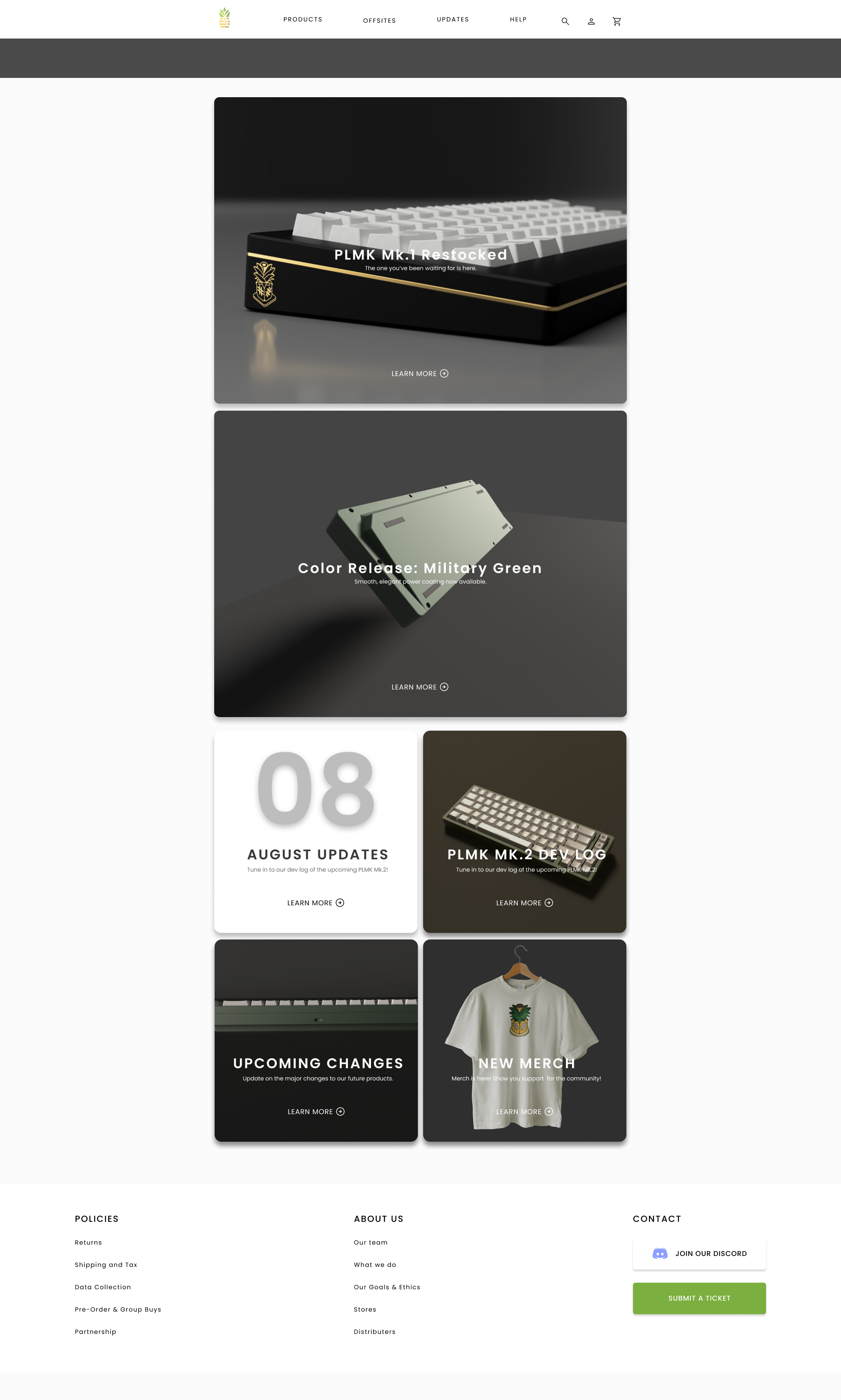
Homepage
Design #2
Browsing Products with Ease
Product Catalogue
Design #3
Improved Customization Experience
Product Details
The gallery now shows updated visual elements of the product such as colors, materials, and parts. The users can also spin the product around for the full view, and see the part they select appear on the screen.
Interaction Animations
These are examples of how the product preview would interact with the user's customization
Design #4
Streamlined Check-Out
Check-Out Process
Following a traditional check-out process, the designs are kept simple and intuitive.
Design #5
Corporate Off-site & Group Orders
Host: Class Sign-up
The host registers the class with details of their group, desired packaged based on the budget, and date. Then the host would schedule a virtual meeting with a team at Pineapple Lab and receives a URL link or a QR  code that can be sent to the rest of the team.
Participants: Creating Custom Order
Accessing the given QR code or link, the participants are led to a screen to customize their keyboards, reducing rate of error and work load for the host from having to check-in with everyone's preferences.
The Process
Sitemap
Sketches
Wireframes
Homepage & Products
Checkout Process
Community Forum
Hi-fi Prototype
Conclusion
Learnings
This project pushed me to think about how to see traditional method of information presentation in different ways. Through feedback and critiques from usability tests, I learned that visual animation and feedback can take user engagement and satisfaction to a different level.
Measuring impact
The first step of this website is now finished. This website now will enter development phase, where the project will be handed off to the web developers. When the website launches, we will be able to collect data on the following aspects:
Conversion Rates
By observing the conversion rate of products or offsites, we can estimate the success of the design. More conversions could imply that the flow is easy enough for users to go through without any frustrations that may deter them from completing the process.
User Reviews
After product delivery or offsite events are completed, ask users for their thoughts on the experience. These qualitative data can help analyze the effectiveness of the designs and confirm the design is working as intended.
Whats Next?
Collaborate with developers and hand off project
Conduct post-launch usability studies to validate designs
Dedicated mobile website development